
 USBDeviceShare : USB Remote Access over Network/Internet
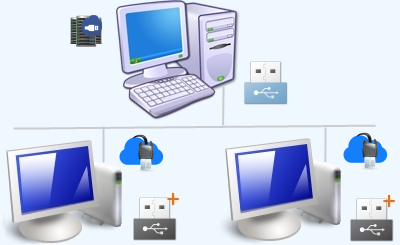
USB Device Share lets you share USB devices and access them remotely over network (LAN or internet). Using this software, USB devices connected to remote computers can be accessed as if they are locally plugged in. Applications which work with the device can then be run without the device being locally present. USBDeviceShare supports only Windows operating systems.
|
|
 Access USB devices over Network

USB Device Share is a USB over Ethernet / USB over Network software. It is a 100% software solution to access USB over network (USB over IP). USBDeviceShare supports all types of USB devices : USB 1.x, 2.0 and 3.0 devices (low, full, high & super speed).
Please note that a USB device shared at server can be accessed only by a single remote client at a time. Simultaneous (concurrent) access to the shared device from multiple clients is not supported. This is a limitation of USB bus and not of USBDeviceShare. (See Auto Connect feature of Client)
Supports all versions of Windows operating system. Supports both 32 bit and 64 bit Windows Editions.
(Windows 2000, Windows XP, Windows 2003 / 2008 Server, Windows Vista, Windows 7 & Windows 8 beta)
We offer 15 days money back guarantee for USBDeviceShare, Free support and Free upgrades for 1 year. Contact us at support@sysnucleus.com.
USBDeviceShare in Action
We recommend that you download and try the free evaluation copy of USBDeviceShare to learn more about the features.
|
Download USBDeviceShare
Download and try the 15 days free evaluation version:  Download USBDeviceShare
 |
USBDeviceShare Manual
View the online help manual to learn more about the features:  View Help Manual
 |
|
|
How to use ?
 Install USBDeviceShare-Server where devices are present.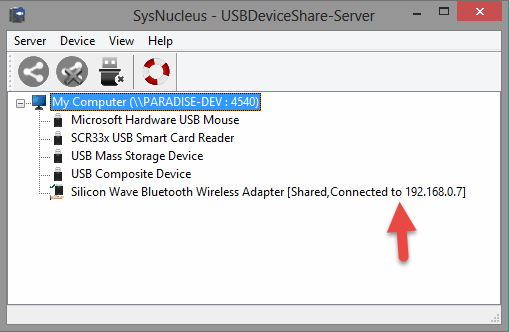
Install USBDeviceShare Server where devices are physically present and where they need to be shared. Shared devices can be accessed remotely over network using USBDeviceShare Client. Server User Guide Install USBDeviceShare-Client where devices need to be remotely accessed.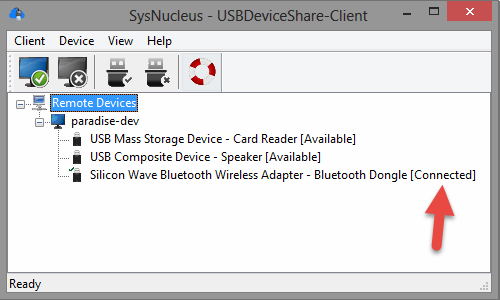
USBDeviceShare Client is used to connect to USBDeviceShare Server and remotely plug-in the shared devices. Client User Guide
Subscribe to updates
You may either subscribe to our mailing list, follow us on twitter or read our blog for updates.
 Read our Blog
 Follow us on Twitter